Apps Script for GTM superpowers, part 1
Five scripts that turn Sheets into a launch control panel: a copy-length formula, one deck per account, follow-up drafts, a Monday digest and a change log. Slides, code and a cheat sheet.

- Apps Script is JavaScript inside Google Workspace. Open a sheet, then Extensions › Apps Script.
- Five scripts:
FITS()for copy length,buildDecks(),draftFollowUps(), a Monday trigger, anonEditchange stamp. - Draft before you send, copy before you overwrite, read the permission screen.
- Slides embedded below, plus a two-page cheat sheet. Part 2 connects scripts to outside APIs.
Launch work in Google Workspace is mostly the same few moves, repeated: copy a deck, change the company name, paste a line from a sheet, draft the same email twenty times. Apps Script does those moves for you. It’s JavaScript that runs inside Workspace, it’s already in your account, and it needs no server.
Part 1 is five scripts a product marketer can run this week. The deck below walks through them. The post has the same code to copy, and the cheat sheet puts all of it on two pages.
Where it lives
Open any Google Sheet and choose Extensions › Apps Script. That opens a script bound to the sheet: it can add menus to that sheet and react when someone edits it. Standalone scripts live at script.google.com and suit jobs that span many files. Everything here is bound to a sheet.
First script: a GTM menu
function onOpen() {
  SpreadsheetApp.getUi()
    .createMenu('GTM')
    .addItem('Build account decks', 'buildDecks')
    .addItem('Draft follow-ups', 'draftFollowUps')
    .addToUi();
}- Paste the code and click Save.
- Pick a function in the toolbar dropdown and click Run.
- The first run asks for permission. Read what it asks for, then allow.
- Reload the sheet. The GTM menu appears next to Help.
Superpower 1: a formula that checks copy length
A function marked @customfunction works in a cell like any built-in formula. This one compares a line with its character budget, so overflow shows up in the sheet before it reaches a slide. It’s the check behind localizing a one-pager without breaking the layout.
/**
 * Says whether a line fits its character budget.
 * @customfunction
 */
function FITS(text, budget) {
  const n = String(text).length;
  return n <= budget ? 'OK' : 'Over by ' + (n - budget);
}
In a cell: =FITS(D2, E2). Google’s custom functions guide covers what they can and can’t do.
Superpower 2: one deck per account, from a template
Put tokens like {{Company}}, {{Pain}} and {{Champion}} on your template slides. Give the Accounts tab matching column headers. One run copies the template for every row and fills in the tokens.
const TEMPLATE_ID = 'paste-your-template-deck-id';

function buildDecks() {
  const [head, ...rows] = SpreadsheetApp.getActive()
    .getSheetByName('Accounts').getDataRange().getValues();
  rows.forEach(row => {
    const copy = DriveApp.getFileById(TEMPLATE_ID)
      .makeCopy('Pitch - ' + row[0]);
    const deck = SlidesApp.openById(copy.getId());
    head.forEach((key, i) =>
      deck.replaceAllText('{{' + key + '}}', String(row[i])));
  });
}
Logos and icons on the template should be vectors so every copy stays sharp: here’s how to add a logo to Google Slides as an editable shape.
Superpower 3: follow-ups as drafts, not sends
Rows marked Ready on a Follow-ups tab become Gmail drafts. Nothing is sent. A person reads every draft and clicks Send.
// Columns: Name, Email, Company, Status
function draftFollowUps() {
  const rows = SpreadsheetApp.getActive()
    .getSheetByName('Follow-ups').getDataRange().getValues();
  rows.slice(1).filter(r => r[3] === 'Ready').forEach(r => {
    const body = 'Hi ' + r[0] + ',\n\nThanks for the time today.';
    GmailApp.createDraft(r[1], 'Next steps for ' + r[2], body);
  });
}
Superpower 4: run it every Monday
A time-driven trigger runs a function on a schedule, with the sheet closed. Run installWeekly once. The digest checks the Days left column of a proof library and emails you what expires within 30 days.
function installWeekly() {
  ScriptApp.newTrigger('weeklyDigest').timeBased()
    .onWeekDay(ScriptApp.WeekDay.MONDAY).atHour(9).create();
}

// Proof tab: column G holds days left.
function weeklyDigest() {
  const rows = SpreadsheetApp.getActive()
    .getSheetByName('Proof').getDataRange().getValues();
  const soon = rows.filter(r => r[6] >= 0 && r[6] < 30);
  if (!soon.length) return;
  MailApp.sendEmail(Session.getEffectiveUser().getEmail(),
    soon.length + ' proof points expire within 30 days',
    soon.map(r => r[1] + ': ' + r[0]).join('\n'));
}
Google’s triggers guide lists every kind of trigger.
Superpower 5: stamp every messaging change
onEdit is a simple trigger: name a function that, and it runs on every edit, no setup. This one writes the time into column I whenever a row on the Messages tab changes.
// Stamps column I when a row on Messages changes.
function onEdit(e) {
  const sheet = e.range.getSheet();
  if (sheet.getName() !== 'Messages') return;
  if (e.range.getRow() === 1) return;
  sheet.getRange(e.range.getRow(), 9).setValue(new Date());
}
Test small
function testFits() {
  console.log(FITS('SSO on every plan', 24));
  // OK
  console.log(FITS('Links that expire when you say so', 24));
  // Over by 9
}
Run the test function from the editor. console.log output shows in the execution log, and View › Executions lists every run.
Before you share a script
- Read the permission screen. It lists exactly what the script can touch.
- Scripts run as whoever runs them, with that person’s access.
- Draft before you send. Copy before you overwrite. Test on copies of real files.
- Quotas apply: one run stops at 6 minutes, and email has daily limits. See Google’s quotas page.
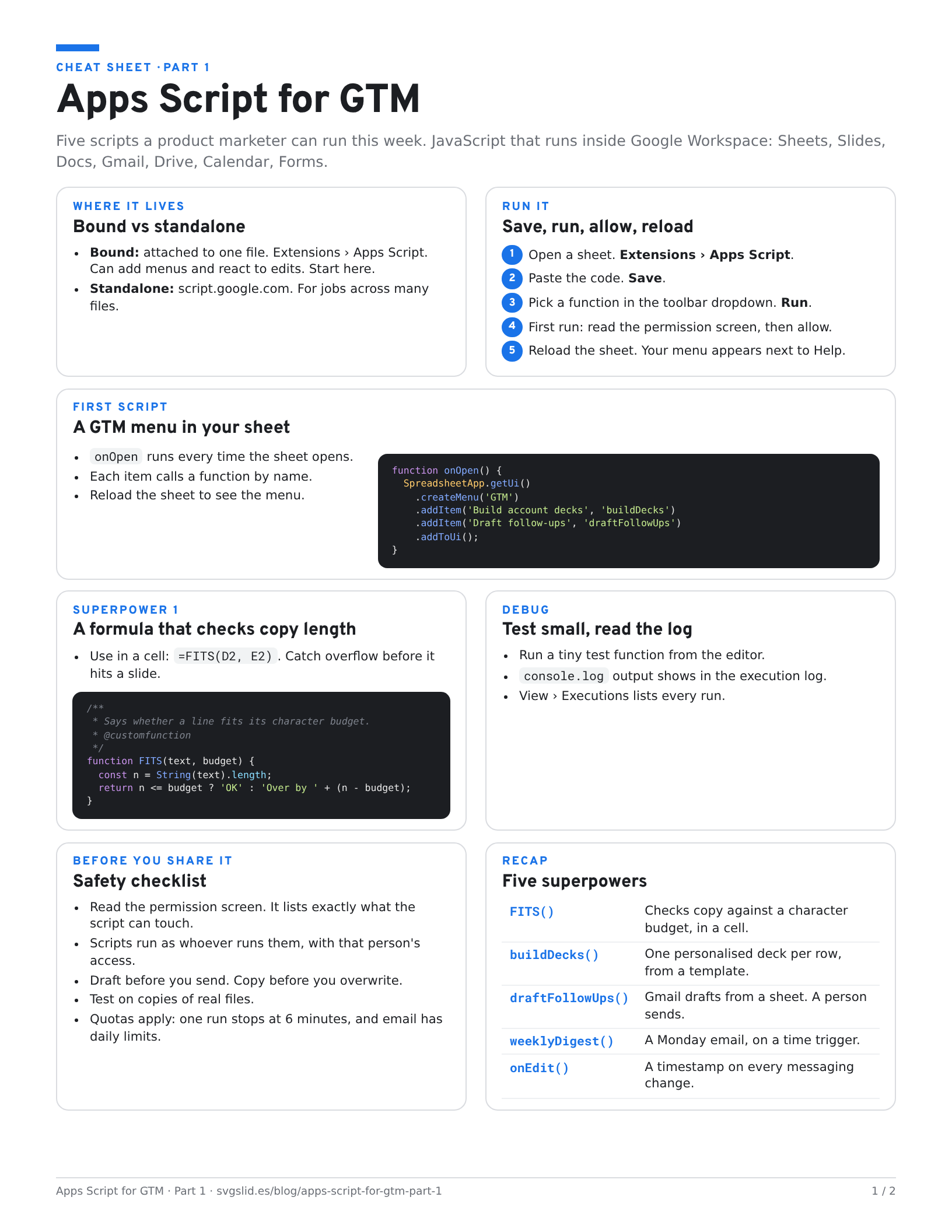
The cheat sheet. Two pages: where scripts live, how to run them, all five superpowers with code, the safety checklist. Print it or keep it next to the editor.
Coming in part 2: talk to everything else
Part 1 stays inside your Google account. Part 2 reaches out:
- UrlFetchApp to pull CRM and product data into Sheets.
- Launch updates posted to a Google Chat space.
- Gemini, called from a script, drafting copy to a character budget.
- A tiny internal web app with
doGet().
What we have tested
- Checked:
FITS()returns OK and Over by 9 for the two test lines above (run in JavaScript outside Apps Script). Every snippet passes a JavaScript syntax check. - Not yet run by us in Apps Script: the menu, deck, draft, trigger and onEdit scripts. They’re written against Google’s Apps Script reference. Run them on copies first.
More builds on the same sheet: update collateral from one messaging sheet, Workspace Studio flows on shared files, diffing Gemini’s deck edits.
The screens in this post are mockups, not captures of Google’s products. Google Slides, Google Sheets, Google Docs, Google Forms, Google Meet, Google Chat, Google Drive, Gemini and Google Workspace and Apps Script are trademarks of Google LLC.