Localize a one-pager without breaking the layout
Translations run long. Give every slot a budget per language, draft in Sheets, and catch the overflow before it reaches the page.

- Translated copy is a layout problem first. German and French lines often run longer than English; Japanese is shorter in characters but wider per character.
- Keep one row per slot in Sheets and one column per language, each with its own character budget.
- Draft with the Sheets AI function. Fill with Gemini now works in 11 more languages. A native speaker approves.
- Flag anything over budget in the sheet. Fix length there, never by shrinking type on the page.
The page breaks before the translation does
A one-pager is built around its English copy. The headline box is sized for eight words. The three benefit columns are sized for two short lines each. Then the German version arrives and every box overflows.
You can fix it slide by slide, file by file, every launch. Or you can treat length as data and catch it before it reaches a page. The second way takes one sheet.
One row per slot, one column per language
Every text box on the page is a slot with a key: headline, subhead, benefit_1_title. The sheet has one row per key. Each language gets a copy column and a budget column.
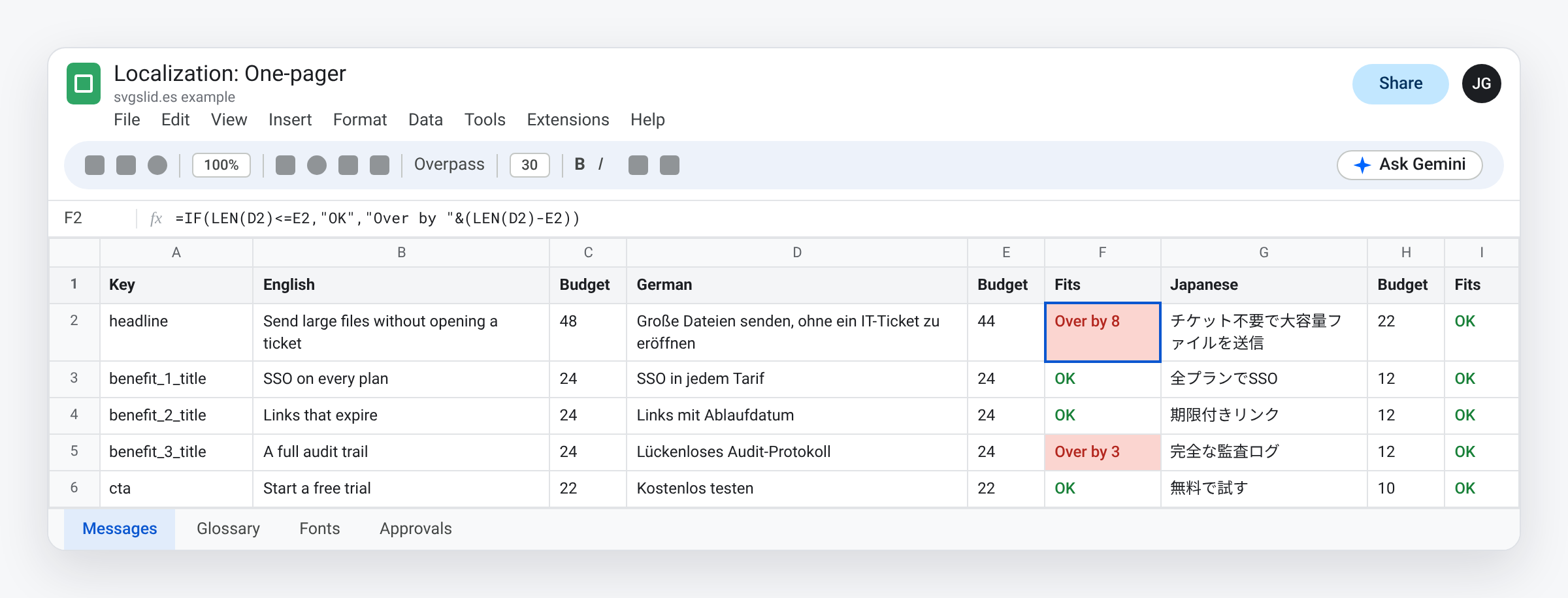
- Key: the slot name. It never changes between languages.
- Source line: the approved English line.
- Budget per language: the most characters that slot can hold in that language, at that size, in that font. Set it by filling the box until it looks full, then counting.
- Fits:
=IF(LEN(D2)<=E2,"OK","Over by "&(LEN(D2)-E2))
Budgets differ by language for two reasons. Some languages need more letters to say the same thing. And a character count is a stand-in for width: a Japanese character takes far more room than a Latin i. Measure each language in its own font.
Draft the translation in the sheet
Google announced on July 7 that Fill with Gemini in Sheets works in 11 more languages. Fill with Gemini runs on the AI function, so you can write the budget into the prompt:
=AI("Translate this product marketing line into German. Keep it under "&E2&" characters. Plain, specific, no exclamation marks.", B2)
Three rules keep this safe:
- A draft is a draft. A native speaker who knows the product approves every line. Machine drafts miss product terms and register.
- Keep a glossary tab. Product names, feature names and terms you never translate. Paste the relevant terms into the prompt.
- Keep draft and approved separate. A formula can recalculate. An approved line must not. Paste approved lines as values.
Catch overflow in the sheet, not on the page
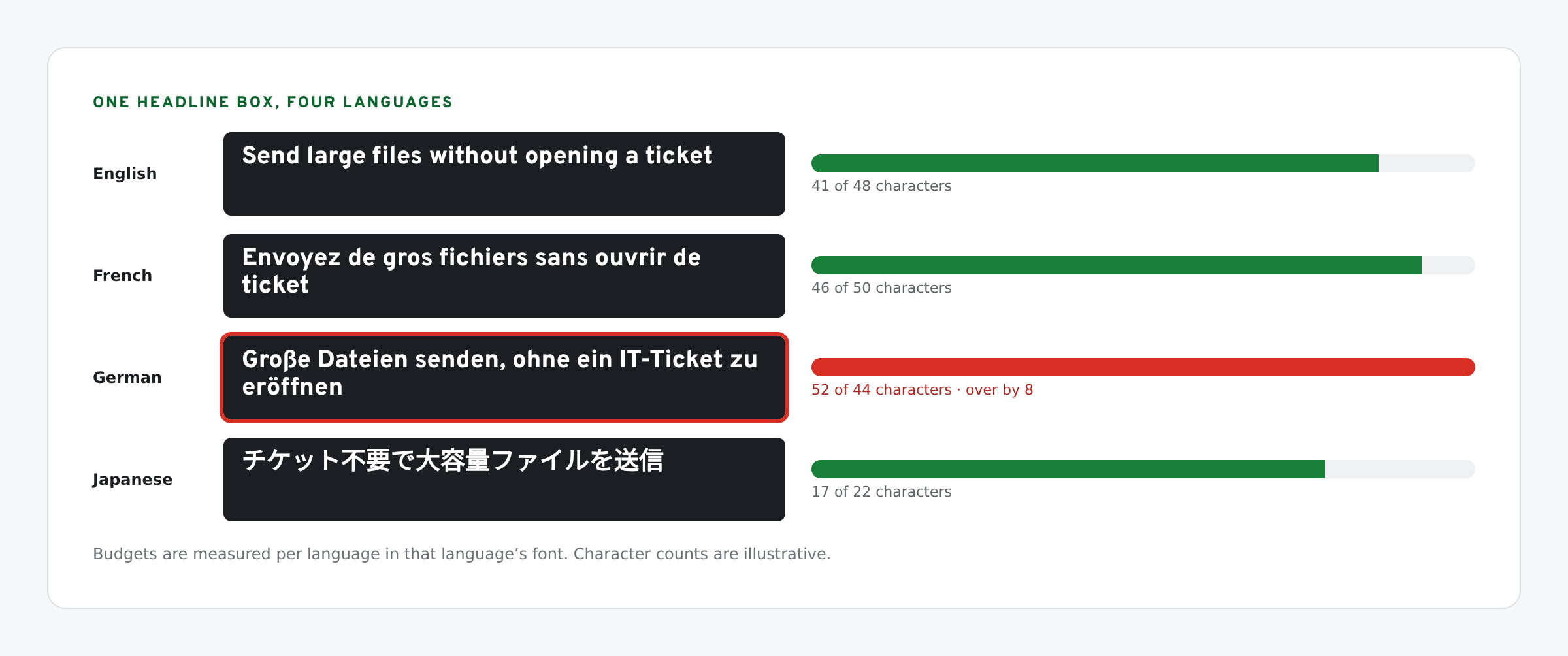
When a line is over budget, shorten the line. Do not shrink the font for one language. A German headline set smaller than the English one breaks the type system you built for every other asset, and readers notice.
Some fixes that work:
- Write a shorter source line. If three languages run over, the English line is too long for the layout.
- Allow a two-line headline in the layout, and budget for two lines in every language.
- Split long compounds with your translator, or choose a shorter term from the glossary.
Fonts per language
Your brand font may not cover every script. Overpass, our headline font, has no Japanese glyphs. Pick a fallback per language and record it in the sheet, so everyone uses the same one. Google Fonts has Noto families for most scripts. Re-measure budgets in the fallback font.
Check letter spacing too. A tracked-out all-caps eyebrow in English can look wrong in a script with no capitals. Set tracking per language.
One file per language
- Make a copy of the finished English file for each language. Keep page size, layout and slot names identical.
- Name files the same way:
One-pager - Relay - de-DE. - Paste approved lines slot by slot. If you tag text boxes with their key in the alt text title, a script can do this for every language at once.
- Look at every page after the copy lands. A count is an estimate; line breaks still surprise.
Logos and icons should not change between languages. Keep them as vectors so one file serves every version: see how to add a logo to Google Slides as an editable SVG.
What we have tested
- Checked in Sheets: the LEN-based fit formula.
- Not checked by us: translation quality from the AI function in each of the 11 new languages. Google’s post lists them; treat every draft as a draft.
Update, Nov 2026: the slot-and-sync approach mentioned above is now written up in full in Update Google Slides collateral from one messaging sheet with Gemini.
The screens in this post are mockups, not captures of Google’s products. Google Slides, Google Sheets, Google Docs, Google Forms, Google Meet, Google Chat, Google Drive, Gemini and Google Workspace are trademarks of Google LLC.