Certify reps on the new message with a Forms quiz
A launch isn't landed until the people selling it can say it. Build a short quiz from the messaging, score it in Sheets, and follow up with whoever missed.

- Since July 30, Help me create in Google Forms can generate a quiz, with correct answers, from a prompt and files.
- The best wrong answers are your own retired lines. They are plausible because you used to say them.
- Score in Sheets, set a pass mark, and follow up one to one.
- Keep it to ten questions. It checks recall of the message, not product knowledge.
A message nobody can repeat isn't launched
Product marketing ships the new positioning, the deck, the one-pager. Two weeks later a rep describes the product the old way on a call. The assets changed. The words in people’s mouths didn’t.
A ten-question quiz after the enablement session tells you who has the new message and who needs a second pass. Google Forms has done quizzes for years. What changed is how fast you can build one.
Route 1: let Gemini draft the quiz
On July 30, Google announced that Help me create in Google Forms now generates quizzes. You describe the quiz in a prompt and point it at files, including PDFs. Gemini drafts the questions, sets quiz settings and marks the correct answers.
Create a 10-question multiple choice quiz for account executives on our new SSO messaging.
Use only the approved lines in the attached messaging doc as correct answers.
Each question gets three wrong answers that sound plausible. Do not invent product facts.
Read every question before you send it. Gemini decides what to ask, and it may test a detail that doesn’t matter. Delete those. Check every correct answer against the messaging doc word for word.
Availability per Google’s post: Business Standard and Plus, Enterprise Standard and Plus, Education Plus.
Route 2: build it from the messaging sheet
If your messages already live in a sheet, a script gives you exact control. The trick is the wrong answers. Generic distractors are easy to spot. Your retired lines are not: they are what the team said last quarter, and they are what a rep will say if the new message didn’t stick.
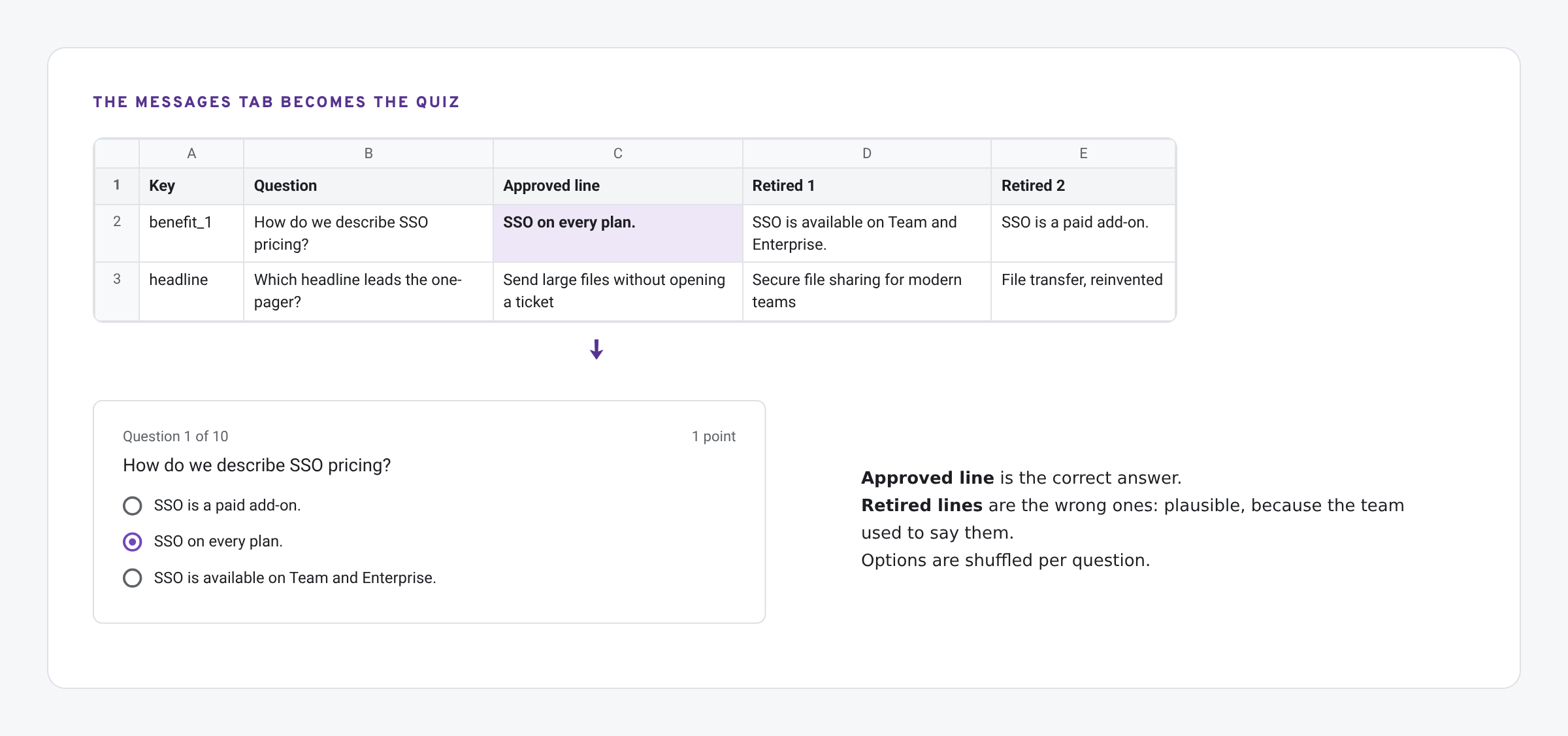
Add a Question column and up to three Retired columns to the Messages tab. Then, in the sheet, open Extensions › Apps Script and paste:
function buildMessagingQuiz() {
  const sheet = SpreadsheetApp.getActive().getSheetByName('Messages');
  const rows = sheet.getDataRange().getValues().slice(1);   // Key, Question, Approved line, Retired 1, Retired 2, Retired 3
  const form = FormApp.create('Messaging check: ' + new Date().toDateString());
  form.setIsQuiz(true);
  rows.filter(r => r[1] && r[2]).forEach(r => {
    const item = form.addMultipleChoiceItem();
    const options = [item.createChoice(r[2], true)]
      .concat(r.slice(3, 6).filter(String).map(t => item.createChoice(t, false)));
    item.setTitle(r[1]).setChoices(shuffle(options)).setPoints(1).setRequired(true);
  });
  form.setDestination(FormApp.DestinationType.SPREADSHEET, SpreadsheetApp.getActive().getId());
  Logger.log(form.getPublishedUrl());
}

function shuffle(a) {
  for (let i = a.length - 1; i > 0; i--) { const j = Math.floor(Math.random() * (i + 1)); [a[i], a[j]] = [a[j], a[i]]; }
  return a;
}
Run buildMessagingQuiz. It creates a quiz form, one question per row, with the approved line marked correct and the options shuffled, and sends responses to a new tab in the same spreadsheet. The FormApp reference covers every call it uses.
Score it and follow up
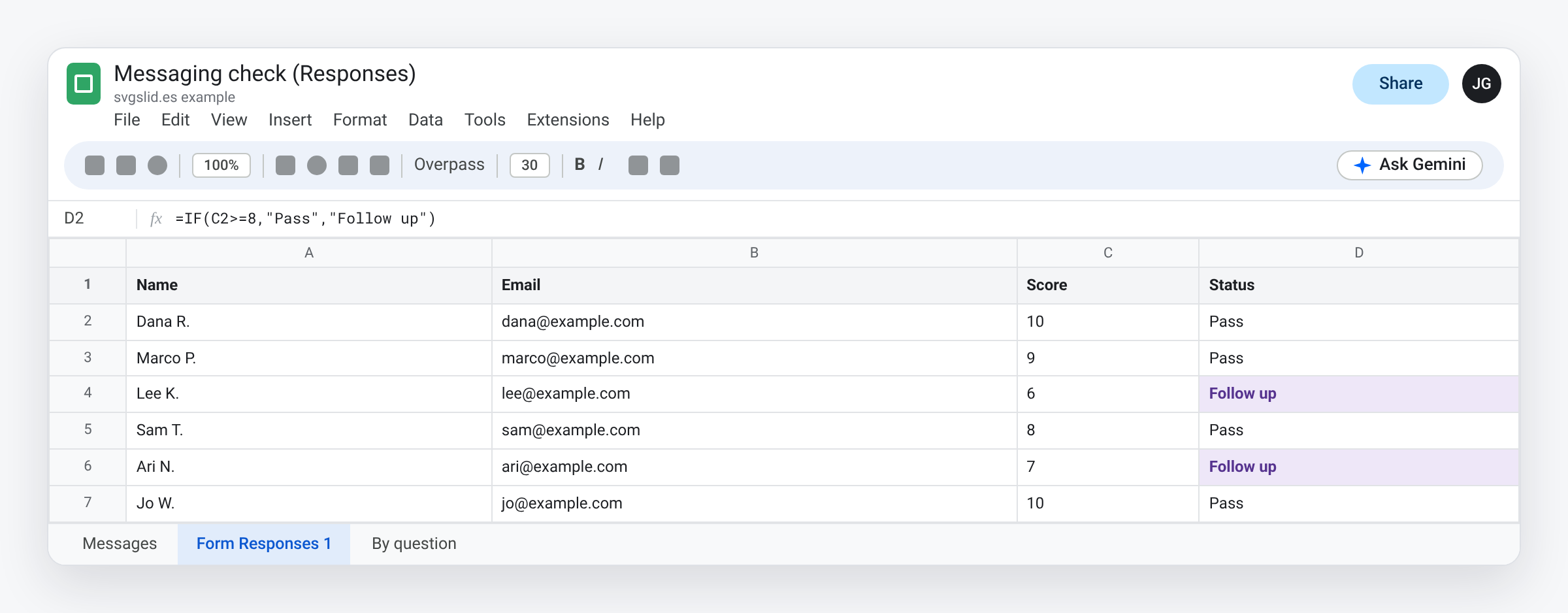
- Pass mark: 8 of 10 is a reasonable start. Add a column:
=IF(C2>=8,"Pass","Follow up"). - Look at the misses by question, not only by person. If half the team picks the same retired line, the message is the problem, not the reps.
- Follow up one to one. A short call beats a public leaderboard.
- Re-run after a change. When a line changes, it moves to a Retired column and becomes a wrong answer in the next quiz.
What we have tested
- Not yet run by us: the script above. It is written against the FormApp reference. Run it on a copy of your sheet first.
- Not yet tried by us: quiz generation with Help me create. Our account did not have it when we wrote this.
The screens in this post are mockups, not captures of Google’s products. Google Slides, Google Sheets, Google Docs, Google Forms, Google Meet, Google Chat, Google Drive, Gemini and Google Workspace are trademarks of Google LLC.