A competitor matrix where every cell cites its source
AI-filled competitive research was unusable because nobody could check it. As of this week, Fill with Gemini attaches a web source to each cell. Build the matrix around that.

- Since October 28, values generated with Fill with Gemini carry web citations per cell in Sheets on the web. Requests can cover up to 3,000 cells.
- Lay the matrix out long: one row per competitor and claim. It sorts, filters and cites cleanly.
- Add a Checked on date and a staleness flag. A citation tells you where to look, not that the claim is true.
- Only cited cells that a person has opened and confirmed reach the battlecard.
What changed on October 28
Competitive matrices go stale fast and are tedious to fill. AI could fill them, but an uncited “Yes” in a pricing column is worse than a blank: someone repeats it on a call.
On October 28, Google announced that Fill with Gemini now provides cell-level citations for web sources. Each generated value gets its sources attached, and you can open them per cell in Sheets on the web. The same update lets one request cover far more cells: up to 3,000, according to coverage of the announcement.
That turns the AI-filled matrix from a liability into a first draft you can audit.
Lay it out long, not wide
The classic matrix has competitors across the top and features down the side. It reads well and maintains badly. Use one row per competitor and claim instead.
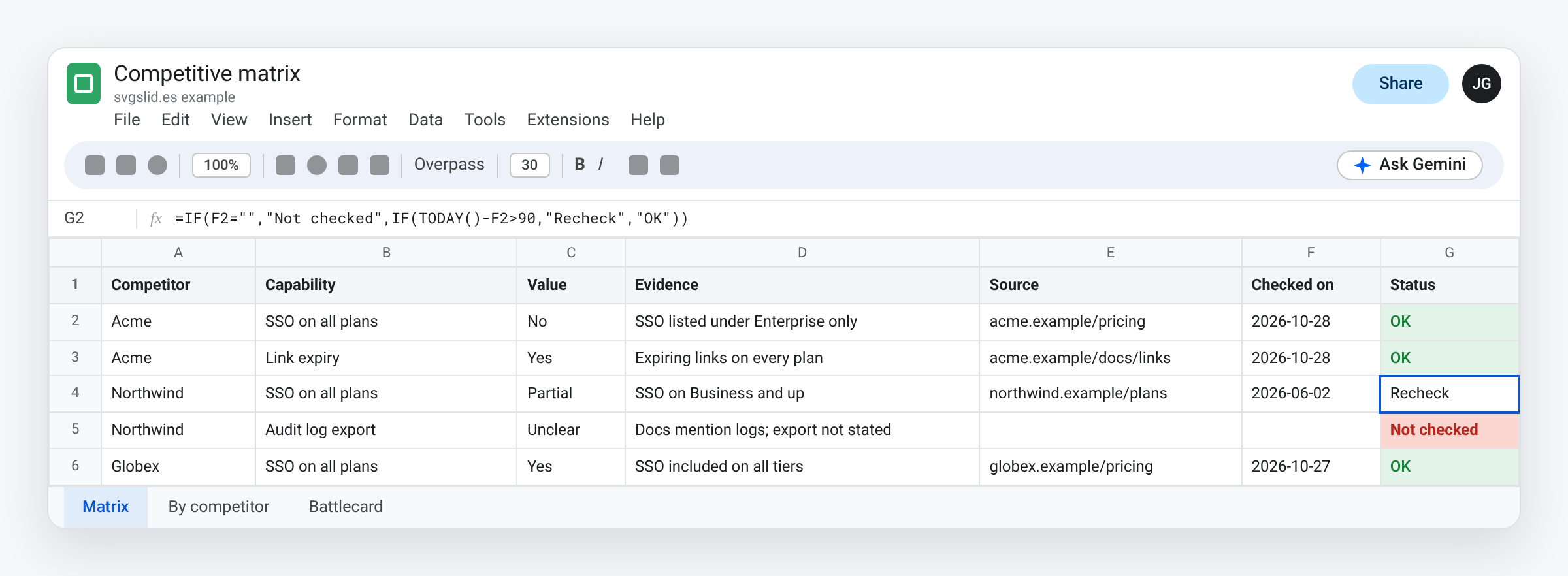
- Competitor and Capability: “Acme”, “SSO on all plans”.
- Value: Yes, No, Partial, Unclear.
- Evidence: one short phrase from the source.
- Source: the URL you confirmed, pasted by hand during review.
- Checked on and Status: who confirmed it, and when.
Long format sorts by competitor, filters by capability, and pivots back into the wide view for a slide whenever you need it.
Fill with Gemini
Select the empty Value cells and use Fill with Gemini, or write the AI function directly:
=AI("Using the vendor's public pricing or documentation pages, does "&A2&" offer "&B2&"? Answer Yes, No, Partial or Unclear, then a short phrase of evidence.")
Open the citations on a few cells before you trust the rest. You are checking two things: that the source is the vendor’s own page, not a reseller or a forum, and that it says what the cell says.
Make staleness visible
=IF(F2="","Not checked",IF(TODAY()-F2>90,"Recheck","OK"))
- Not checked: AI value, nobody opened the source. Never leaves the sheet.
- Recheck: confirmed more than 90 days ago. Pricing pages change.
- Unclear values are research tasks. Assign them.
From matrix to battlecard
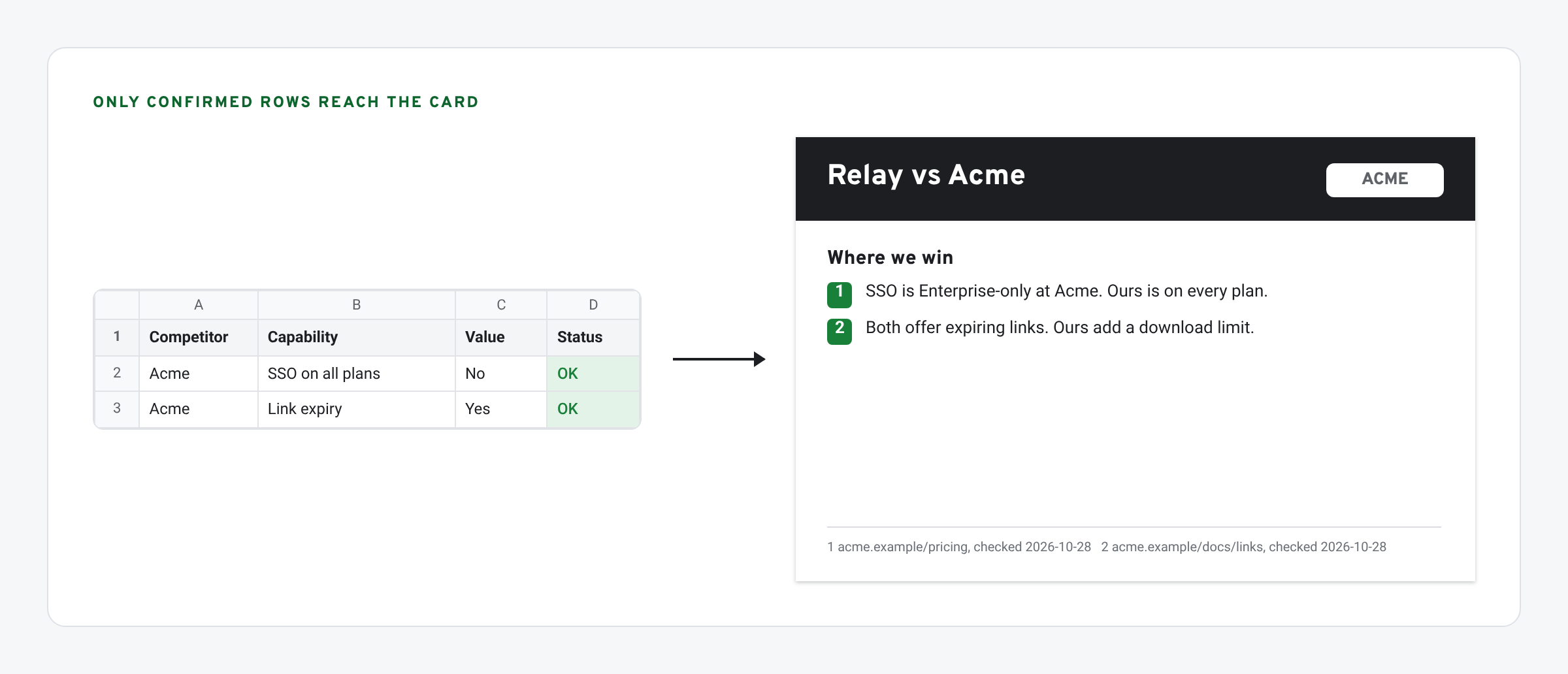
Filter the matrix to Status = OK for one competitor. Those rows, and only those, go on the battlecard, each with a numbered footnote to its source. Reps can open the source in front of a prospect, which is the point. Put the competitor’s logo on the card as a vector so it prints cleanly: here is how to add a logo to Google Slides.
Customer proof on the same card has its own expiry dates. Track those in a proof library. Charts that compare you with the competitor should match your brand: draw them as native shapes.
What we have tested
- Checked in Sheets: the staleness formula.
- Not yet checked by us: cell-level citations. They were rolling out when we wrote this. We also don’t know yet whether a script can read the citations, so the Source column is filled by hand.
The screens in this post are mockups, not captures of Google’s products. Google Slides, Google Sheets, Google Docs, Google Forms, Google Meet, Google Chat, Google Drive, Gemini and Google Workspace are trademarks of Google LLC.